|
E-mail verification |
  
|
| Show/Hide Hidden Text |
|
E-mail verification |
|
| Show/Hide Hidden Text |
When registering on a web resource it is often necessary to confirm your registration by e-mail.
For this ZennoPoster 3 has a special function that will login on a specified server and then starts searching for an e-mail corresponding to the current registration. Once this e-mail is found the text (or several texts) that it contains is parsed.
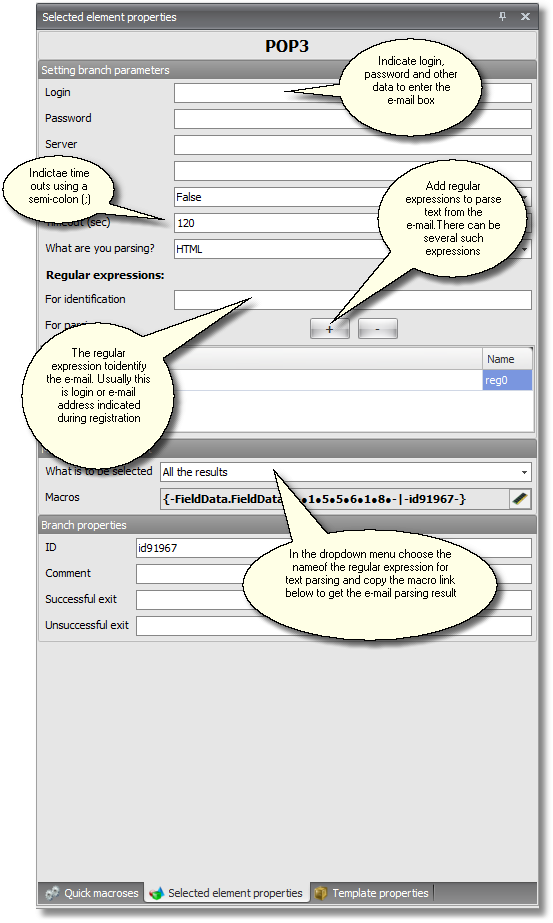
Entering your e-mail box
To enter your e-mail box you need to indicate the usual data as in any mail program, e.g. login, password, server name, port number and coding used.
Once your login is complete you can parse either source text or its HTML version depending on what is more convenient for a particular e-mail.
Searching for an e-mail
To search for an e-mail, a regular expression is used that specifies that something needs to be found in a particular e-mail. Even if this e-mail box receives other e-mails from the specified web resource this regular expression is always targeted at only one of those. More often than not this regular expression consists of the login. Many servers return e-mails containing the registered login and in all e-mails coming from this server this login is different. You can also use the address of the e-mail you indicated during the registration.
Configuring a time-out in e-mail search
Set a time out, i.e. a number of seconds at expiration to which a login to your e-mail box will be affected and several e-mails will be chosen among which the search will be executed. You can set several time-outs separated by a semi-colon (;). In this case, if the correct e-mail is not found after the first time-out, the system will wait for the expiration of time indicated in the second time-out to repeat the search. This process will continue until either the correct e-mail is found or all your time-outs expire.
Parsing text in an e-mail
Add one or several regular expressions to parse text from an e-mail. The located/found text will be stored in the macro link indicated at the bottom of Element Properties Panel. If you added several expressions to find text in an e-mail then you can take several macro links. Different regular expressions have different macro links leading to the parsing result. This difference manifests itself in the name of a regular expression.
Important!
| 1. | The registration confirmation branch does not go by itself to the URL to confirm registration. It just looks for this URL in the text of an e-mail. Then you need to take this link and follow it in another step (or branch). |
| 2. | If you use the dots and plus feature in Gmail then you still write the login for Gmail and e-mails collection without dots and a plus. |
Similar sections:
| 1. | To read about a wizard for automatic configuration of registration confirmation by e-mail red the Quick Start - e-mail confirmation section. |
| 2. | You can see the screenshot of this wizard here. |