|
"Sources" |
  
|
|
"Sources" |
|
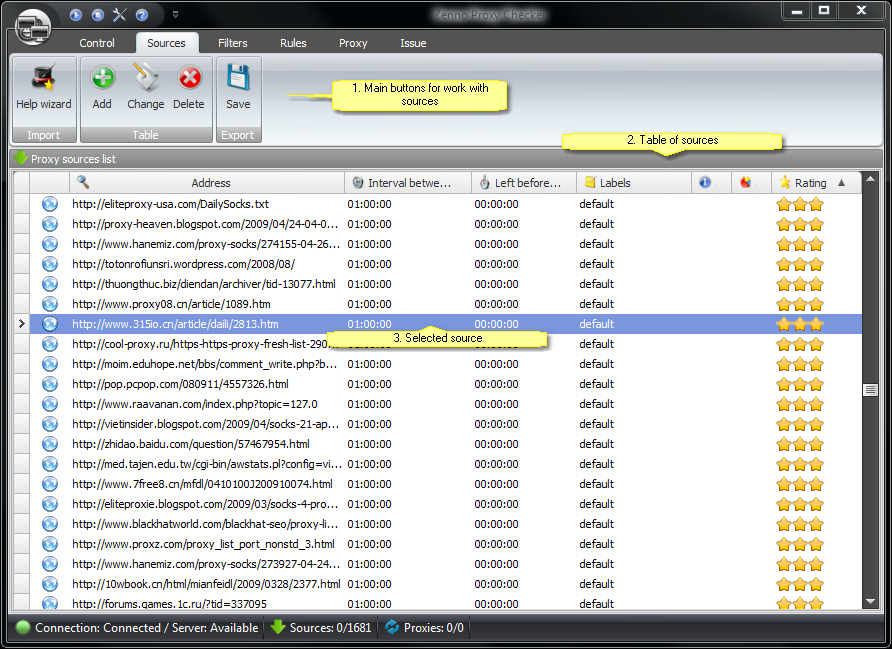
Description:
1. Main control buttons that focus on source processing
These button groups (the upper row is the same as the lower) account for the main features of working with sources.
Assistant |
Adds sources using the assistant. The most preferable way of adding sources. |
Add |
Adds sources, using the "Source settings" form. More information on how to add sources. |
Modify |
Modifies the sources selected at the moment using the "Source settings" form. More information on how to insert changes. |
Delete |
Deletes selected sources and all their proxies. More information on how to delete them. |
Save |
Resource export. More information on the export. |
2. Table of all the sources
All the sources added into the program are shown in the table.
Shortcuts:
To select all the sources press Ctrl+A.
To modify the source double click it.
To delete selected sources press the Del key.
3. Selected source
Right click the selected sources to open a pop-up menu to make operations with them.