|
RegExp builder |
  
|
| Show/Hide Hidden Text |
|
RegExp builder |
|
| Show/Hide Hidden Text |
For the easy and quick writing of regular expressions use this builder
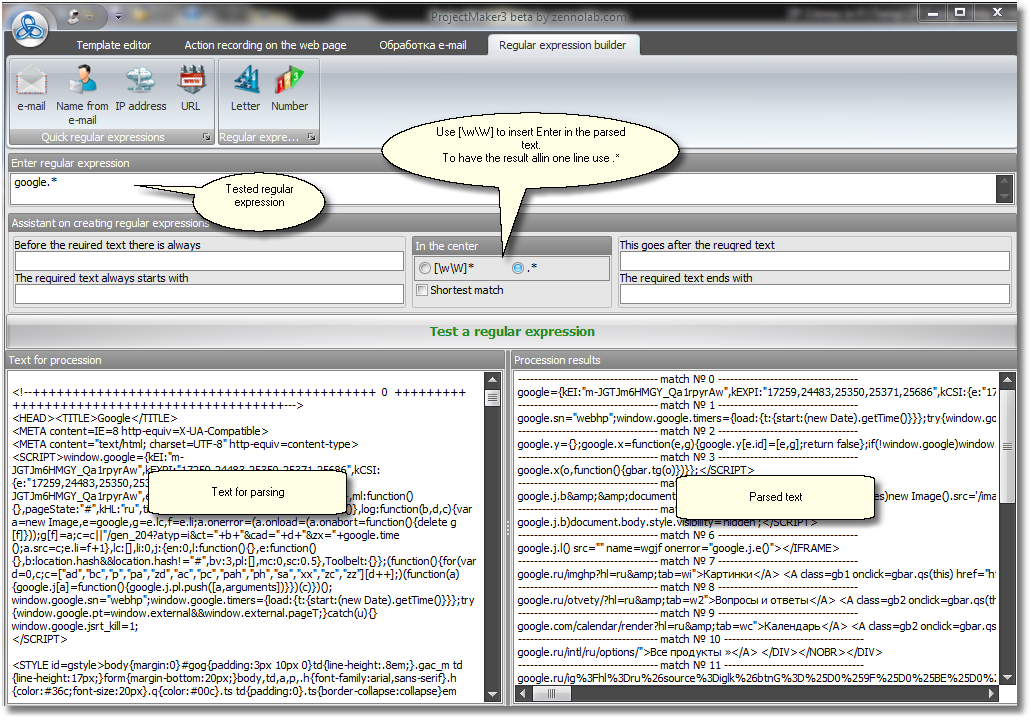
| 1. | Insert a sample text in which you are looking for a particular subtext into the left large editing space. |
| 2. | Write your regular expression. Usually a regular expression for text parsing is conceived using beginning and end of the searched text as well as text preceding and following the searched one. For this below the regular expression field you will find four other fields. Adding the corresponding text into these fields you will see above how your regular expressions is combined. |
| 3. | In the middle of the builder there is a possibility to choose the middle part of the searched text. If you choose [wW]* then line breaks can appear in the middle of your text. And if you choose .* then your search will be effected within one line. There is also a checkbox, by ticking this the shortest match will be searched for. You will understand what this option is for when you face a very specific problem. |
| 4. | Press the 'Test Regular Expression' button. In the right large editing space the parsing result will appear (in case matches are found). There can be several matches. They will be separated by a dividing text. |
| 5. | When successful and the parsing process has returned the correct text, located in the upper field you will get a ready-to-use regular expression. If something went wrong, return to step 2. |