|
Data preparing and set |
  
|
| Show/Hide Hidden Text |
|
Data preparing and set |
|
| Show/Hide Hidden Text |
To extract text from the file use a special macro 'Extract line from text'. You can find this option in the Macros Builder under the heading 'Files and Directories'.
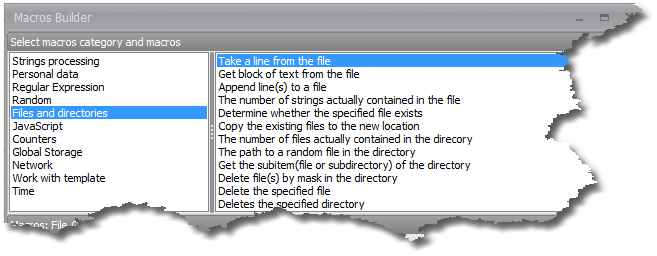
Extracting lines from the file one by one
To do this pick a 0 number line and select the delete option. Deleting can be enabled by clicking in the corresponding box in the macro properties. Select true to delete and false to keep the line after extraction.
Extracting a random line from the file
To do this write random in the line number field in the macro.
Usually, you do not need to use the delete function for such cases, if you do need it then you can always select it.
Extracting a range or several ranges of lines
If you need to extract, for instance, lines from number five to number seven then you write the following in the line number field:
4-6 (less for one line as numeration starts with 0).
You can indicate several ranges separating them with a semi column ( ; ) or comma ( , ).
Example: 10-15;7;22-34
You do not know the length of the file but you need to extract it all
The end of file is designated by the key word end.
So you simply indicate the range 10-end, for example, and it will extract lines starting from the eleventh one and up until the file end.
Extracting all lines from the file
To extract all lines from the file you can put as the line number -1.
Extracting a random line or several random lines from a range
To do this write random in the line number field then the number of lines you need to extract and then in brackets indicate the range of lines from which to extract.
Example:
random1(1,12-15,35-end) - to extract one line from a range
or
random15(1,12-15,35-end) - to extract 15 lines from a range.
Deleting the file
If you simply need to delete the file use the delete file macro (Directory.DeleteFile) to be found under the heading 'Files and Directories' in the Macros Builder.
Important!
| 1. | Enumeration of lines always starts with 0. Keep that in mind when defining a line number. |
| 2. | Delete function works for all line extracting options, be it extraction of a random line, a range of lines, etc. |
| 3. | When extracting all lines existing in the file, the file itself is deleted automatically. |