|
Creating macros |
  
|
| Show/Hide Hidden Text |
|
Creating macros |
|
| Show/Hide Hidden Text |
The program features a utility called Macros Builder. The name suggests that this is a tool used to create macros.
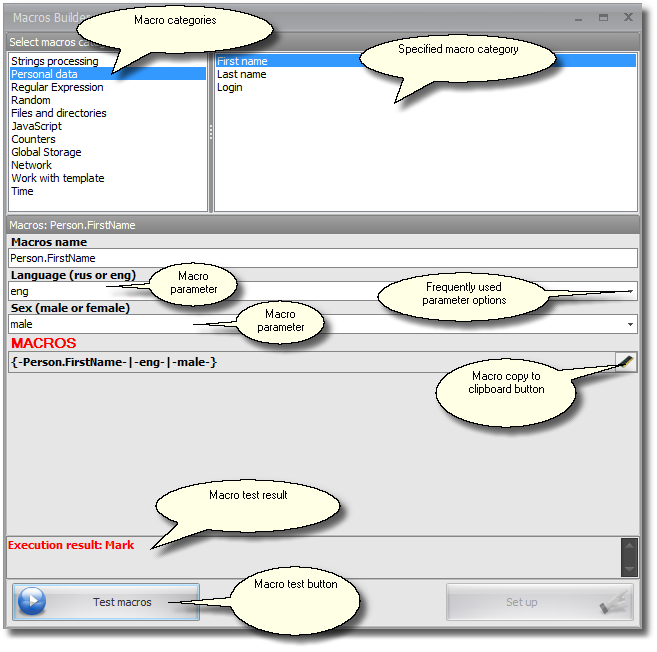
The tool can be activated in the two following manners:
1. By using the controls in the template editor;
2. During the process of template writing (recording) and setting the value of a modified element of the web page. In this case you should right click anywhere inside your browser field to activate the corresponding pop-up menu.
Macros Builder consists of two windows on top. The first is used to select a macro category, e.g. macros to work with lines or macros generating some personal data like login, password, etc. In the other window you select a specific macro. After the choice is made you will see below some fields where you should input your macro parameters. Names of the fields help you easily understand which parameters should be entered and what their functions are. Sometimes a parameter can be selected from a dropdown list. After all the parameters are set, in the very last non editable field ,you can get the macro you just built.
The new macro can be tested, but this testing cannot be applied to all macros (as many as 95% of macros are testable). Those macros that refer to the template's fields are not testable.
After having pressed the macro test button you will see the result of the test.
Similar sections:
| 1. | Read more on macros and their applications in the Work With Macros section. |