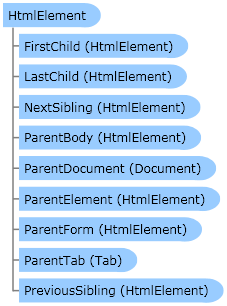
Represents an HTML element on a Web page. Contains the methods to search for html elements, gets or sets of values.
 Object Model
Syntax
| C# | |
|---|
public class HtmlElement |
Example
This example uses the
Document object to search for html elements and setting their values.
| C# |  Copy Code Copy Code |
|---|
using System;
using System.Drawing;
using Zennolab.CommandCenter;

namespace Sample
{
    internal class Example
    {
        public static int Execute(Instance instance)
        {
            instance.ClearCookie();

            Tab tab = instance.MainTab;
            if ((tab.IsVoid) || (tab.IsNull)) return -1;
            if (tab.IsBusy) tab.WaitDownloading();
            tab.Navigate("lessons.zennolab.com");
            if (tab.IsBusy) tab.WaitDownloading();

            Document doc = tab.MainDocument;

            HtmlElement he = doc.FindElementByAttribute("input:checkbox", "fulltag", "input:checkbox", "text", 0);

            if (he.IsVoid) return -1;

            he.SetValue("true", true);

            he = doc.FindElementByName("rad");

            if (he.IsVoid) return -1;

            he.SetValue("0", true);

            return 0;
        }
    }
} |
| PHP | Copy Code |
|---|
<?php
import namespace System;
import namespace Zennolab:::CommandCenter;

class Step1
{
    public static function Execute($instance)
    {
        $instance->ClearCookie();

        $tab = $instance->MainTab;
        if (($tab->IsVoid) || ($tab->IsNull)) return -1;
        if ($tab->IsBusy) $tab->WaitDownloading();
        $tab->Navigate("lessons.zennolab.com");
        if ($tab->IsBusy) $tab->WaitDownloading();

        $doc = $tab->MainDocument;

        $he = $doc->FindElementByAttribute("input:checkbox", "fulltag", "input:checkbox", "text", 0);

        if ($he->IsVoid) return -1;

        $he->SetValue("true", true);

        $he = $doc->FindElementByName("rad");

        if ($he->IsVoid) return -1;

        $he->SetValue("0", true);

        return 0;
    }
}
?> |
Remarks
Inheritance Hierarchy
Requirements
Target Platforms: Windows XP Home Edition, Windows XP Professional, Windows Server 2003 family, Windows Vista, Windows Server 2008 family
See Also