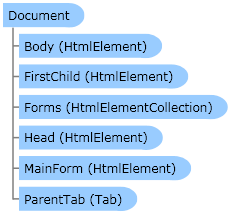
Represents a document on a Web page. Contains the methods to search for html elements, gets or sets of values.
 Object Model
Syntax
Example
This example uses the
Document object to search for html elements and setting their values.
| C# |  Copy Code Copy Code |
|---|
using System;
using System.Drawing;
using Zennolab.CommandCenter;

namespace Sample
{
    internal class Example
    {
        public static int Execute(Instance instance)
        {
            instance.ClearCookie();

            Tab tab = instance.MainTab;
            if ((tab.IsVoid) || (tab.IsNull)) return -1;
            if (tab.IsBusy) tab.WaitDownloading();
            tab.Navigate("lessons.zennolab.com");
            if (tab.IsBusy) tab.WaitDownloading();

            Document doc = tab.MainDocument;

            HtmlElement he = doc.FindElementByAttribute("input:checkbox", "fulltag", "input:checkbox", "text", 0);

            if (he.IsVoid) return -1;

            he.SetValue("true", true);

            he = doc.FindElementByName("rad");

            if (he.IsVoid) return -1;

            he.SetValue("0", true);

            return 0;
        }
    }
} |
| PHP | Copy Code |
|---|
<?php
import namespace System;
import namespace Zennolab:::CommandCenter;

class Step1
{
    public static function Execute($instance)
    {
        $instance->ClearCookie();

        $tab = $instance->MainTab;
        if (($tab->IsVoid) || ($tab->IsNull)) return -1;
        if ($tab->IsBusy) $tab->WaitDownloading();
        $tab->Navigate("lessons.zennolab.com");
        if ($tab->IsBusy) $tab->WaitDownloading();

        $doc = $tab->MainDocument;

        $he = $doc->FindElementByAttribute("input:checkbox", "fulltag", "input:checkbox", "text", 0);

        if ($he->IsVoid) return -1;

        $he->SetValue("true", true);

        $he = $doc->FindElementByName("rad");

        if ($he->IsVoid) return -1;

        $he->SetValue("0", true);

        return 0;
    }
}
?> |
Remarks
Inheritance Hierarchy
Requirements
Target Platforms: Windows XP Home Edition, Windows XP Professional, Windows Server 2003 family, Windows Vista, Windows Server 2008 family
See Also