|
Set output to the local port |
  
|
|
Set output to the local port |
|
(This feature is available only in ZennoProxyChecker)
To use a local port as an output pass to the "Output" window and press the "New" button:

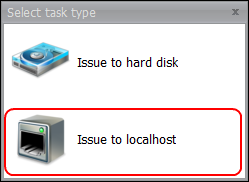
In the emerged window select "Set output to local port":
The Outtask setting window opens::
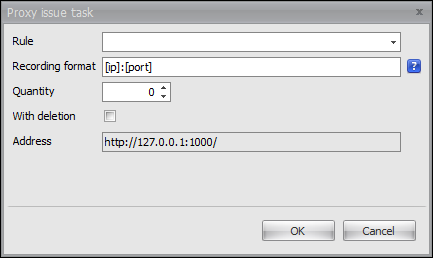
Description of the window fields:
Rule |
You can specify a rule's name for proxy selection. If you leave this field empty, all the proxies will be taken |
Output format |
You can specify a format for adding proxies to the file with the help of special tags. To see a list of tags place the cursor to the question mark on the right of the field. |
Number |
Number of proxies selected. If you specify 0, all the proxies will be taken . |
With deletion |
Possibility to delete proxies selected by the task after they have been taken. If it is marked, proxies will be considered as "taken" with the parameter "last time of use" filled in. |
Address |
This field is not active: it shows an address where you can receive the task result (it is also available in the browser). Output port can be modified in the program's additional settings changing the OutputTaskLocalhostPort parameter. See more details here. |
As soon as the fields are completed with the necessary data the task will emerge in the program's task list:
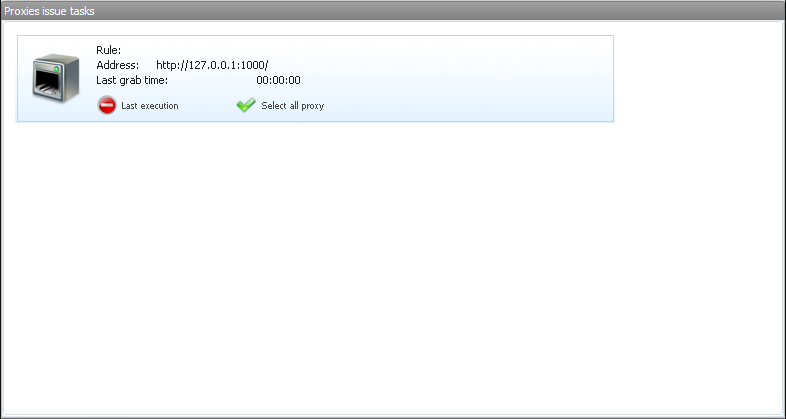
Pay attention to the "Last execution" status.
Possible variants:
1) Green - at least one proxy was selected during the last execution.
2) Red - not a single proxy was not taken during the last execution.