|
Template execution |
  
|
| Show/Hide Hidden Text |
|
Template execution |
|
| Show/Hide Hidden Text |
After the template is created and debugged, you can begin working with it. Open ZennoPoster to launch the template.
If you have a multi-threaded version of the program, select the number of threads you wish to work with.
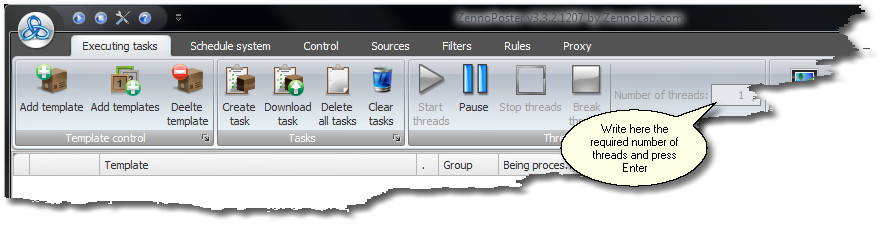
Press the 'Add Template' button, select the template file and in the open window, please configure the template execution parameters.
You can add several templates at a time by pressing the 'Add Templates' button.
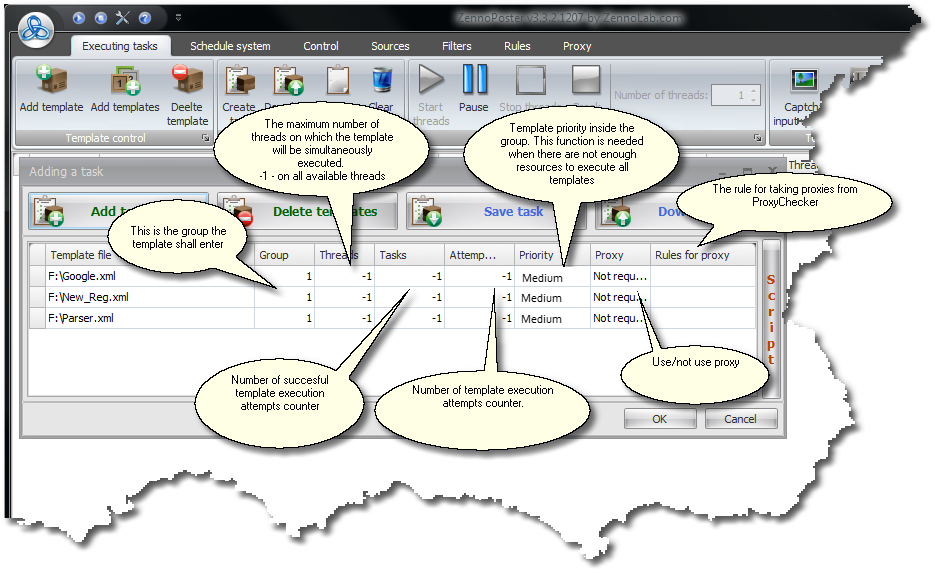
During the setting up of template parameters you can:
| • | Group several templates together for subsequent execution, i.e. Execution of templates will start from the group having a smaller number and continue with groups with bigger numbers. This feature might prove useful when results of execution of the first group of templates are needed to go on with execution of the second group. |
| • | Limit execution of a template to several threads only, i.e. with 10 running threads, for example, you can limit the template of registering at hotmail.com to not more than three threads only. |
| • | Have your template being executed as many times as needed for its error-free execution, e.g. 100 times. |
| • | Or set a maximum of 100 attempts for the template execution without bothering with whether or not execution results will be successful. |
| • | Set necessity or desirability of executing the template through a proxy. |
| • | Set a rule following which proxies will be extracted from the ProxyChecker. |
In the second tab of ZennoPoster's interface you will find a scheduler (?) allowing you to set exact timing for the number of template (or group of templates) executions, e.g. once in an hour, once every five minutes or on a specified date and at specified time. All the settings mentioned above remain valid when the scheduler function is applied.