|
Instance |
  
|
| Show/Hide Hidden Text |
|
Instance |
|
| Show/Hide Hidden Text |
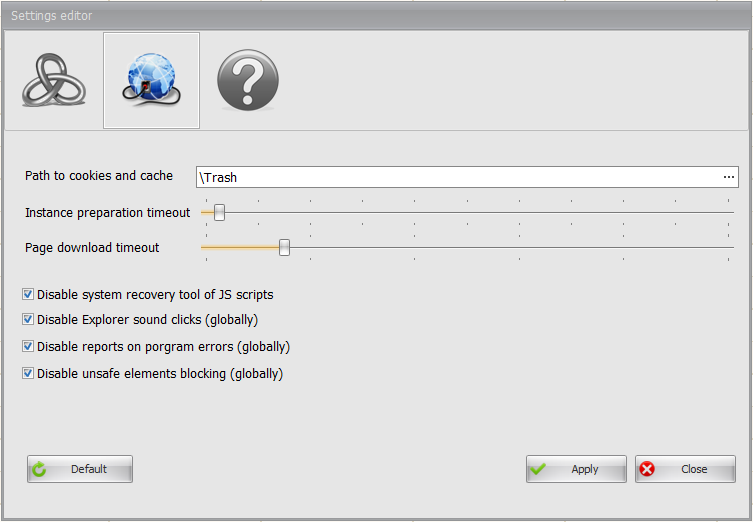
Path to cookies and cache — this setting is only for the Pro-version — exists to save temporary files in the created folder (it is recommended to save it in the program folder)
Instance preparation timeout — time spent on each tab initializing, i.e. actually — delay before each template execution.
Page download timeout — time allocated for the web-page download, sometimes required to load certain elements (for example, CAPTCHAs). Sometimes when a page is not fully downloaded the "html-element not found" message emerges. In this case this parameter can be increased, but note that its increase brings about the template execution time rise.
Deactivate JS scripts system debugger – Java scripts are executed on some web-pages with errors that are detected by the system itself. To skip them, activate this setting.
Deactivate Explorer ticks — this option disables the tick sound in Explorer. Ticks are disabled globally, including transitions between folders in Explorer.
Deactivate reports on program errors — sometimes due to the browser internal problems the instance "falls", ZennoPoster detects this and reestablishes the fallen instance operation. If while instance falling the window with an error message floats the instance is unlikely to reboot.
Block unsafe elements — mainly required for blocking windows from Java-applets.